
How to Assign an Instructor to a Pathway
How to Assign an Instructor to a Pathway
In this article:
- Overview
- Assign an Instructor
- Remove an Instructor
- Things to keep in mind
- FAQs
- Who can do this
Overview
An Instructor is the person shown as leading a Pathway. Naming one puts a familiar face to the learning and makes it clear who's responsible for it. You set the Instructor in the Pathway settings panel by searching for a person in your organisation.
Assign an Instructor
- Go to Pathways and open the Pathway.
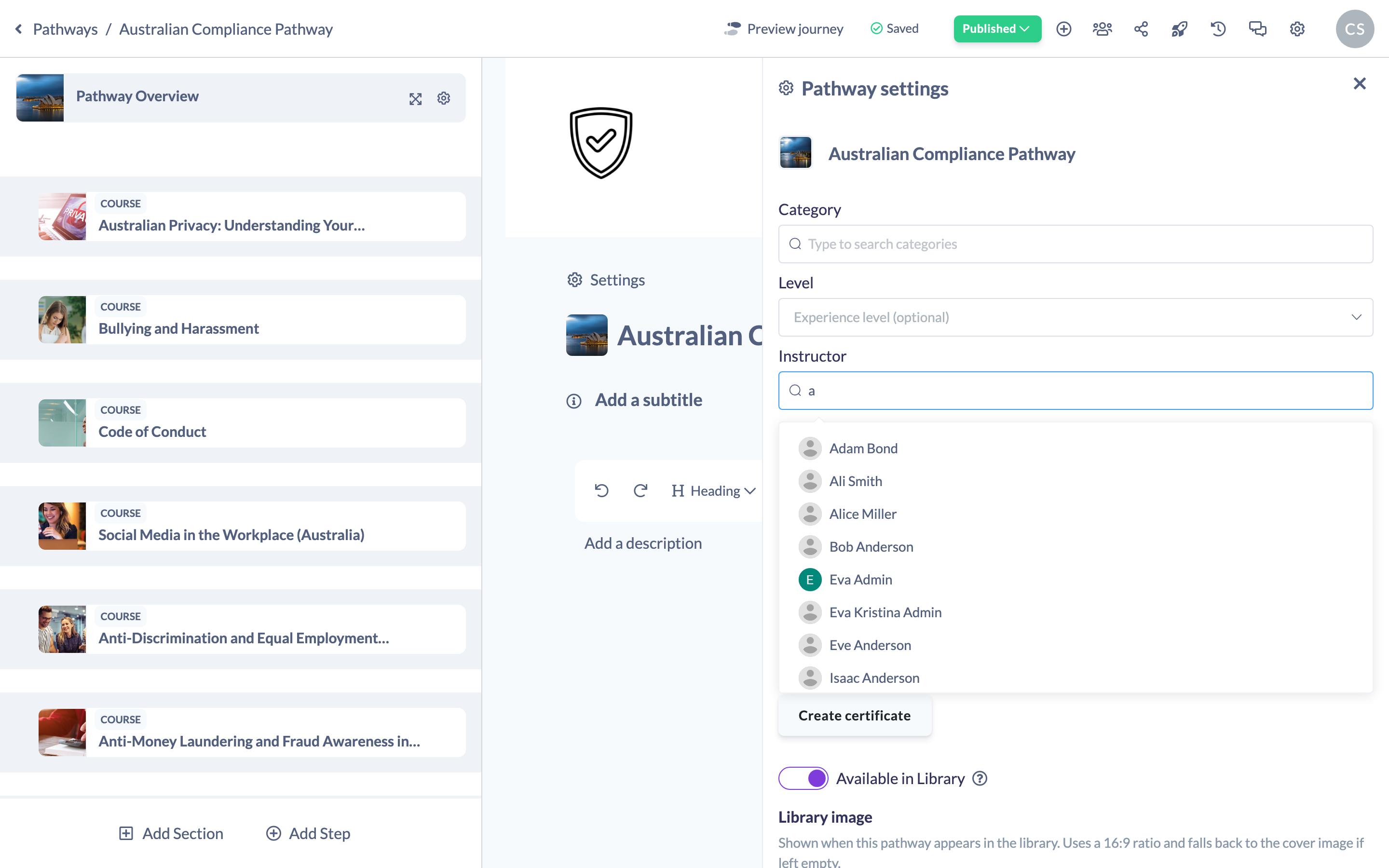
- In the pathway header, click the Settings (cog) icon to open the Pathway settings panel.
- Find the Instructor field and start typing a name in the search box.
- Select the person from the suggestions. They're added as the Instructor and the change saves automatically.
Remove an Instructor
- In the Instructor field, the current Instructor is shown with their name and avatar.
- Click the × next to them to remove them.
- The search box reappears so you can choose a different person, and the change saves automatically.
Good to know: A Pathway has one Instructor at a time. Selecting a new person replaces the current one.
Things to keep in mind
- You can search for anyone in your organisation by name; select them to make them the Instructor.
- Only one Instructor can be assigned per Pathway.
- The Instructor is a descriptive setting — it identifies who leads the Pathway and doesn't change who can edit it.
FAQs
Can a Pathway have more than one Instructor?
No. Each Pathway has a single Instructor. To change it, remove the current one and select someone else.
Does assigning an Instructor give that person edit access?
No. The Instructor field is descriptive. Editing rights come from a person's role, not from being named the Instructor.
How do I clear the Instructor?
Click the × next to the current Instructor to remove them.
Who can do this
Owners, Admins, Managers, Content Managers and Instructors can assign or change a Pathway's Instructor. People Managers, Employees and Restricted users have read-only access to Pathways and cannot change this setting.
Updated on: 18/07/2026
Thank you!