
Requesting Evidence
Requesting Evidence
In this article:
- Overview
- Require evidence on a step
- What learners see
- Things to keep in mind
- FAQs
- Who can do this
Overview
Sometimes you need a learner to prove they've done something — attach a certificate, share a screenshot of a completed task, or link to their work — before a step counts as complete. SuperPath lets you request this by turning on the Learning Evidence requirement on a Pathway step and describing exactly what the learner should provide. When they reach the step, they upload their proof rather than simply marking it done.
Require evidence on a step
- Open the Pathway and select the step you want to gate. (Evidence applies to content and text steps — not to Form, Pathway or Section steps.)
- In the step settings, find Learning Evidence and turn on Require evidence of learning completion.
- In the description box, spell out what's needed — the field prompts you to "Describe what evidence needs to be submitted as part of this learning step" (for example, "Please upload the completion certificate for the course").
- Publish the Pathway to apply the change.
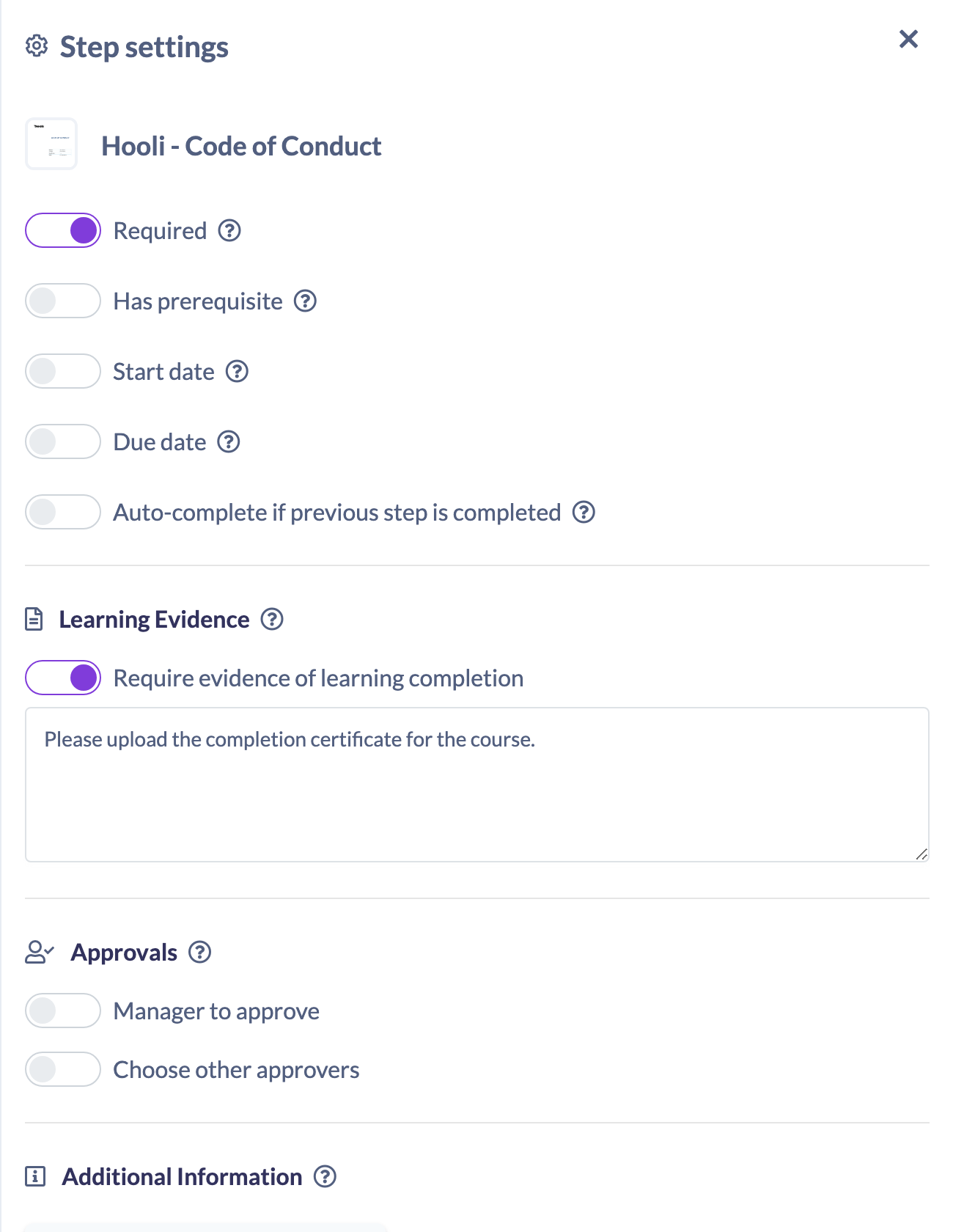
Tip: If you also want someone to sign the evidence off before the step completes, add an approval in the same step settings. See How to Set Up Manager or Assessor Approval of Evidence.
What learners see
When a learner reaches a step that requires evidence, the completion button reads Submit Evidence instead of Mark as complete. Clicking it opens a window where they can upload a file or paste a link, add a description, and submit their proof.
For the learner's full walkthrough, see How to Submit Evidence for a Learning Step.
Things to keep in mind
- Evidence is set per step, so you can require it only on the steps that matter and leave the rest open.
- Requiring evidence on its own lets a learner complete the step once they've submitted. If you need someone to approve the evidence first, add an approval as well.
- The description you enter is shown to the learner, so be specific about what counts as acceptable proof.
FAQs
What can a learner submit as evidence?
A file upload or a link, along with a short description of what they're providing.
Does requiring evidence mean someone has to approve it?
No — those are separate. Requiring evidence lets the learner submit proof; adding an approval means a nominated approver has to sign it off before the step completes.
Which steps can require evidence?
Content and text steps. Form, Pathway and Section steps don't offer the evidence requirement.
Who can do this
Owners, Admins, Managers, Content Managers and Instructors can require evidence on a step, because doing so means editing a Pathway step. People Managers, Employees and Restricted users have read-only access to Pathways and cannot change these settings. Submitting evidence is done by the learner assigned the step.
Updated on: 24/07/2026
Thank you!