
When are Badges Awarded?
When are Badges Awarded?
In this article:
- Overview
- The five "Awarded when" rules
- Things to keep in mind
- FAQs
- Who can do this
Overview
Badges are visual awards that recognise learner achievements. When you create a Badge, you set a single rule — the Awarded when rule — that decides when it's earned. Learners then receive the Badge automatically whenever they meet that rule; there's no manual awarding step.
This article explains the five rules you can choose from. For the full walkthrough of building a Badge, see How to Create a Badge; to switch the feature on, see How to Enable Badges.
The five "Awarded when" rules
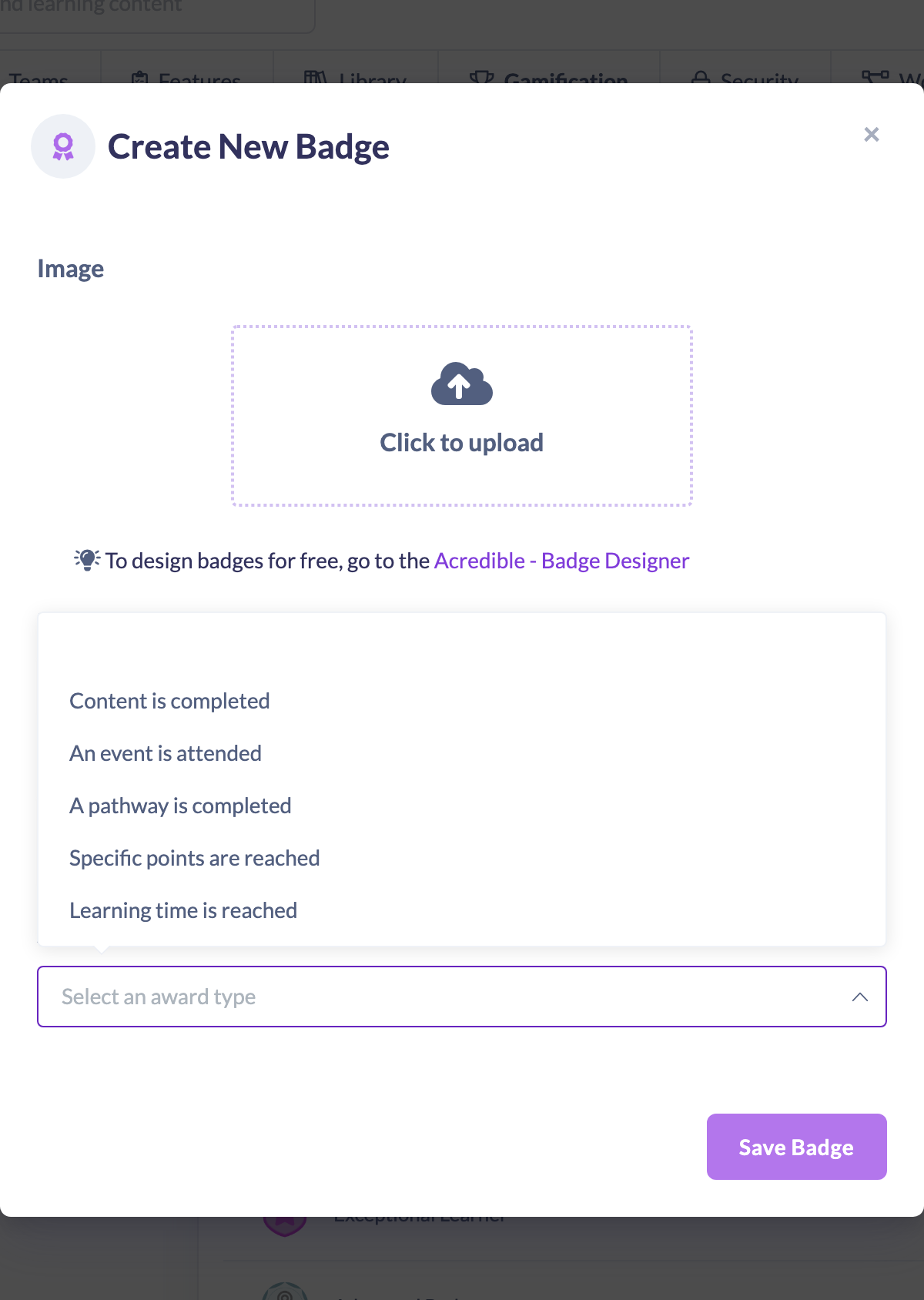
When you create or edit a Badge, the Awarded when dropdown (labelled Select an award type until you pick one) offers five rules. Choosing one reveals the extra field you need to complete:
- Content is completed — search for and select a specific piece of content from your Library. The Badge is earned when a learner completes that content.
- An event is attended — select a specific Event. The Badge is earned when a learner attends that Event.
- A pathway is completed — select a specific Pathway. The Badge is earned when a learner completes that Pathway.
- Specific points are reached — enter a total number of Points. The Badge is earned when a learner reaches that Points total.
- Learning time is reached — enter a total number of learning minutes. The Badge is earned when a learner reaches that amount of learning time.
Things to keep in mind
- Each Badge has exactly one rule. If you want to recognise different achievements, create a separate Badge for each.
- Badges are always earned automatically once a learner meets the rule — there's no option to award a Badge to someone manually.
- For the Specific points are reached and Learning time is reached rules the value must be greater than zero; for the content, Event and Pathway rules you must select a specific item.
FAQs
Can one Badge be awarded for more than one thing?
No. Each Badge is tied to a single Awarded when rule. Create a separate Badge for each achievement you want to recognise.
Can I award a Badge to a learner manually?
No. Badges are only ever earned automatically when a learner meets the Badge's rule.
Where do I set the rule?
In the Awarded when dropdown when creating or editing a Badge — see How to Create a Badge.
Who can do this
All learners earn Badges automatically once they meet a Badge's rule. Creating and configuring Badges — and choosing the Awarded when rule — is limited to Owners and Admins, because the Gamification and Badges settings live under Settings, which only those roles can access. Managers, Content Managers, People Managers, Instructors, Employees and Restricted users can't reach those settings.
Updated on: 24/07/2026
Thank you!