
How to Choose Which Details to Collect at Registration
How to Choose Which Details to Collect at Registration
In this article:
- Overview
- How to choose which details to collect
- Things to keep in mind
- FAQs
- Who can do this
Overview
When someone signs up through your registration page, you decide what information to ask them for. First and last name are always collected, and beyond that you can choose to ask for a person's Position, Location, and Employee ID — turning each one on or off, and deciding whether it's required.
This keeps your registration page as short or as thorough as you need: ask for nothing extra, or gather the details you rely on to organise your people from day one.
How to choose which details to collect
- Go to Settings → Security.
- In the Self-Registration section, click Configure page.
- Scroll to Standard fields.
- Turn on the toggle next to Position, Location, or Employee ID to collect that detail.
- For any field you're collecting, tick Required if the person must fill it in before they can finish signing up.
- Click Save.
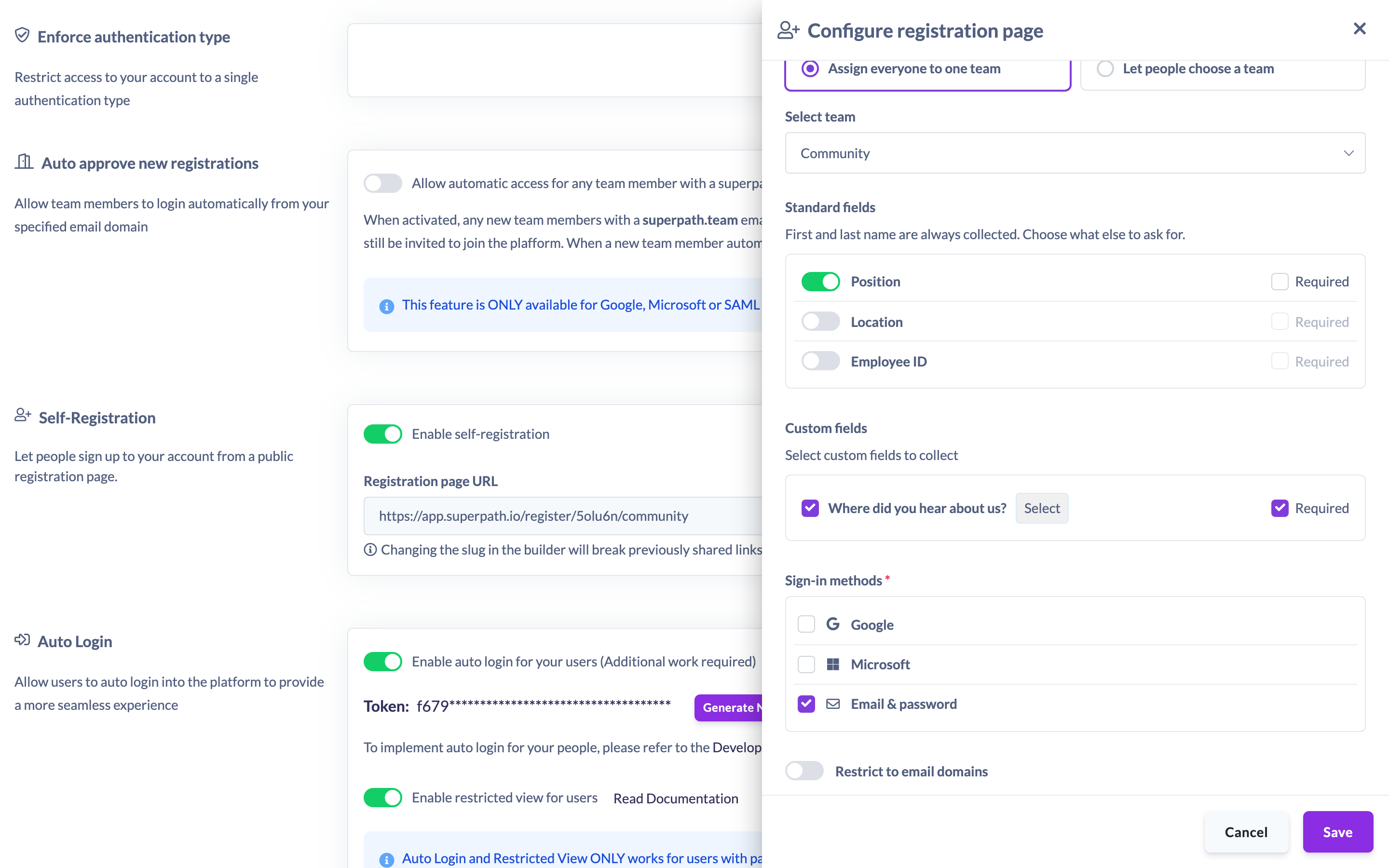
First and last name are always collected — there's no toggle for them, because they're needed to create the account.
Note: If you turn a field off, its Required setting is cleared automatically. A field can only be required while you're collecting it.
Things to keep in mind
- First and last name are always asked for and can't be switched off.
- Position, Location, and Employee ID are optional. Each has its own on/off toggle and its own Required setting.
- A field must be turned on before it can be marked Required — turning a field off removes its required status.
- The person's email address isn't a field you configure. It comes from the verified sign-in they use to register (for example their Google, Microsoft, or email-and-password sign-in), so it's always captured without being typed into a form field.
- Required fields are enforced when the person submits, so they can't skip a detail you've marked as required.
FAQs
Do I have to collect a position, location, and employee ID?
No. First and last name are always collected, but Position, Location, and Employee ID are each optional — turn on only the ones you want.
Can I ask for a detail but not force people to fill it in?
Yes. Turn the field on and leave Required unticked. The person will be asked for it but can leave it blank.
Why isn't there a field for the person's email address?
Email is taken from the verified sign-in the person uses to register, not from a field on the form, so it's captured automatically and doesn't need to be configured.
Who can do this
Only the Owner can configure Self-Registration, including which details are collected. The Self-Registration settings live under Settings → Security, which is restricted to the Owner. Admins, Managers, People Managers, Content Managers, Instructors, Employees, and Restricted users cannot access these settings.
Updated on: 19/07/2026
Thank you!