
How to Edit or Delete a Roadmap Assessment
How to Edit or Delete a Roadmap Assessment
In this article:
- Overview
- How to edit an assessment
- How to delete an assessment
- Things to keep in mind
- FAQs
- Who can do this
Overview
Assessments on a Roadmap level — whether a learner's self-assessment or an assessment submitted by a Manager or Admin — can be edited or removed while the level is still in progress. Editing lets you correct a rating or reword an evaluation; deleting removes the entry entirely.

How to edit an assessment
- Open the Roadmap and scroll to the Assessments section on the level page.
- Find the assessment you want to change and click the ... menu on the right of its card.
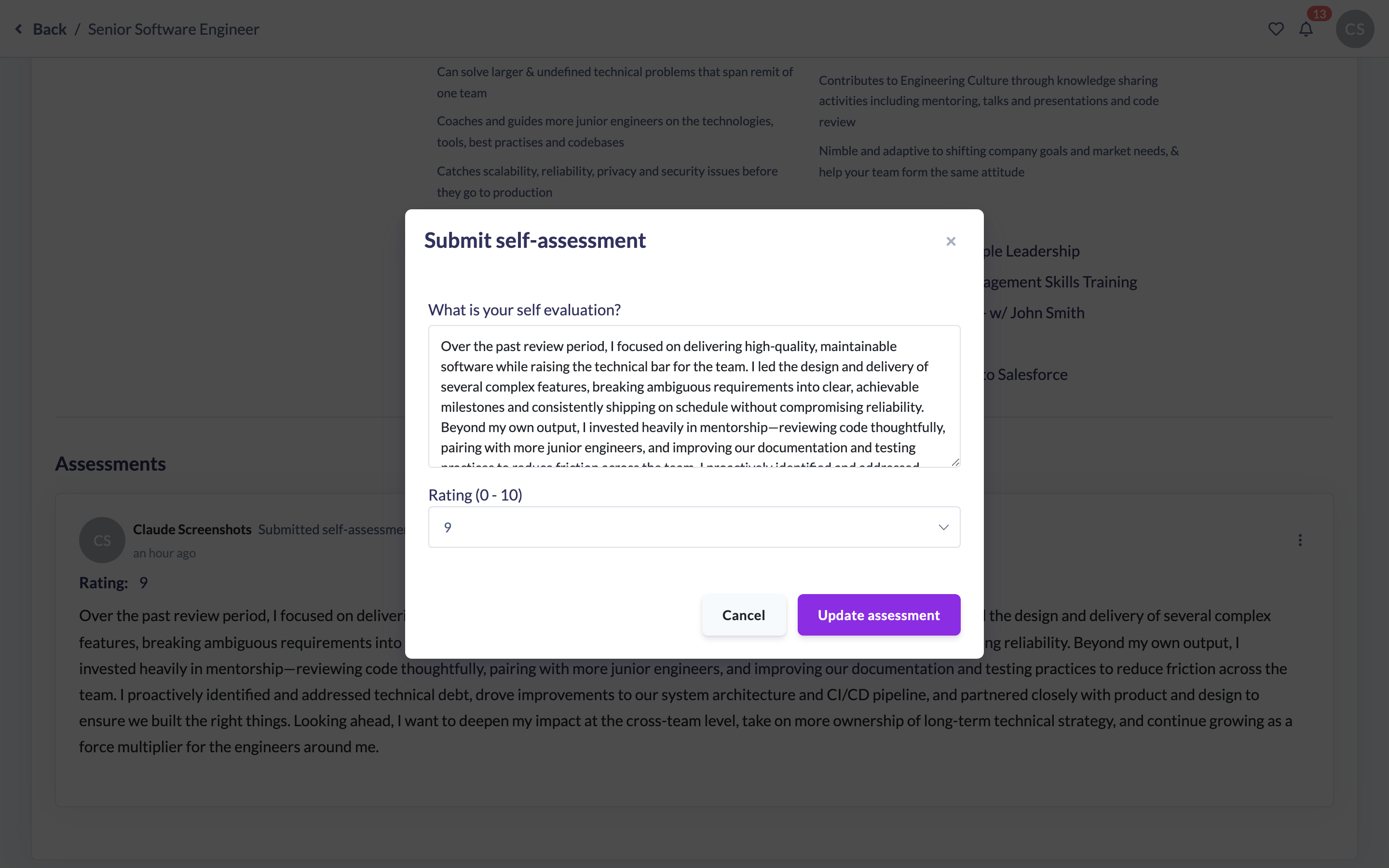
- Choose Edit. The assessment reopens in the dialog with its existing evaluation and rating.
- Update the evaluation text and/or the Rating.
- Click Update Assessment to save your changes.
How to delete an assessment
- In the Assessments section, click the ... menu on the assessment's card.
- Choose Delete.
- In the Delete assessment dialog, confirm the prompt: "Are you sure you want to delete this assessment?"
- Click Confirm delete to remove it, or No thanks to keep it.

Note: Deleting an assessment removes that single entry only — it doesn't affect the learner's level, progress or any other assessments on the level.
Things to keep in mind
- The Edit and Delete options only appear while the level is still in progress. Once the level is marked complete, its assessments are locked and can no longer be changed or removed.
- Deleting is immediate on confirmation — there's no separate undo, so remove an assessment only when you're sure.
- Editing and deleting are available both for self-assessments and for assessments submitted by Managers or Admins, subject to who you are (see below).
FAQs
Can I edit someone else's assessment?
Learners can edit and delete only their own assessments. The learner's Manager, and any Admin or Owner, can edit or delete any assessment on that person's level.
Why don't I see the Edit or Delete option?
Either the level has already been marked complete (which locks all its assessments), or you don't have permission to change that particular assessment.
Does deleting an assessment affect the learner's progress?
No. It only removes that one entry; the level, its status and all other assessments are untouched.
Can I get a deleted assessment back?
There's no self-service restore for a deleted assessment, so double-check before confirming.
Who can do this
The Edit and Delete actions appear on an assessment card when the level is still in progress and you are one of: the author of that assessment (you can always manage your own), the learner's Manager or People Manager, or an Admin or Owner. Every role is permitted by the API to update and delete roadmap assessments, so the effective limits are this on-screen rule plus whose Roadmap you can view. No one can edit or delete assessments on a level that has been marked complete.
Updated on: 16/07/2026
Thank you!