
How to Notify a Manager When Someone Completes a Learning
How to Notify a Manager When Someone Completes a Learning
In this article:
- Overview
- Option 1: Notify on completion (per Pathway or assignment)
- Option 2: A Workflow that notifies the manager
- Which option should I use?
- How "the manager" is worked out
- Things to keep in mind
- FAQs
- Who can do this
Overview
Keeping managers informed when their people finish a Pathway, course or other learning is one of the most common things teams set up in SuperPath. There are two ways to do it: a built-in Notify on Completion setting on the learning itself, and a more flexible Workflow. Both work, and you can use either (or both).
Option 1: Notify on completion (per Pathway or assignment)
Pathways and individual assignments have a built-in Notify on Completion setting that sends an automatic notification the moment the learning is completed:
- Open the Pathway (or the learning you're assigning) and go to its settings.
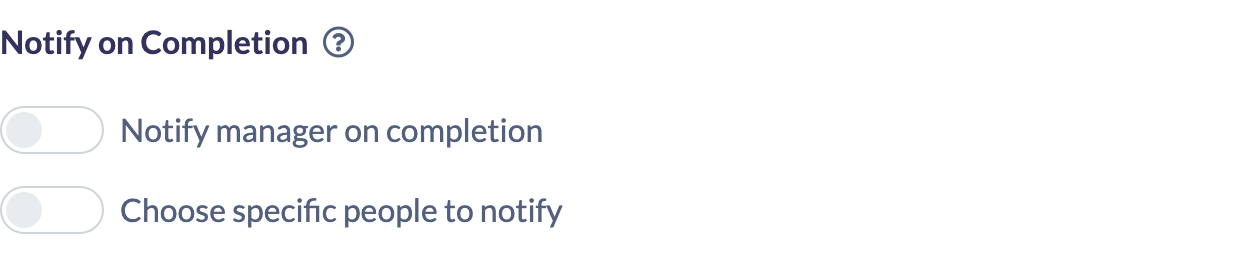
- Find the Notify on Completion section.
- Turn on Notify manager on completion to notify the completing person's manager automatically.
- Optionally, turn on Choose specific people to notify to also notify named people or Teams (for example your HR or compliance Team).
- Save.
From then on, whenever someone completes that learning, their manager receives the Learning Completed notification (by email and, where connected, Slack and in-app).
Note: This relies on the Learning Completed communication being switched on for your account (Settings → Features → Communications). If completion notifications aren't arriving, check that toggle first.
Option 2: A Workflow that notifies the manager
Workflows let you send a fully customised message when a completion happens, and they cover more learning types (Pathways, content, events, forms and roadmaps):
- Go to Settings → Workflows.
- Select Create new workflow.
- Choose a completion trigger, for example Pathway is completed or Content is completed. You can narrow it to a specific Pathway or piece of content, or leave it to apply to all.
- Add the Send a notification action.
- Under recipients, turn on Their Manager. You can also add specific people or Teams.
- Enter a Title and Message. You can personalise it with variables such as the recipient's name and the completed learning.
- Send a test to yourself, then save.
Which option should I use?
- Use Notify on Completion when you want a quick, standard "someone finished" alert tied to a specific Pathway or assignment, and you're happy with the built-in message.
- Use a Workflow when you want to control the wording, add a call-to-action button, notify managers across many learnings at once, or cover content, events, forms or roadmaps.
How "the manager" is worked out
In both options, "the manager" is resolved the same way, based on your account's manager setup:
- If Use Teams for Managers is switched on, the notification goes to the Team's manager (and any additional managers). By default that includes the managers of every Team above it in your Team structure.
- Otherwise, it goes to the person's directly assigned line manager on their profile.
Notify the nearest manager only
If your Team structure has several levels, managers near the top can receive a notification for everyone below them. To send it to the nearest manager only, go to Settings → Features, find the People section and turn on Notify the nearest manager only. It's greyed out until Use Teams for Managers is on.
With it on:
- The notification goes to the manager and additional managers of the person's own Team.
- If that Team has no manager, it goes to the nearest Team above that has one, and stops there.
- A Team's manager is not notified about their own learning. Their notification goes to the managers of the Team above.
The same applies to assessment and approval notifications. Managers further up can still open, assess and approve their people's learning. They just aren't notified about it.
If a learner has no manager set, there's no manager to notify — so make sure line managers or Team managers are configured.
Things to keep in mind
- Both mechanisms are separate code paths and can both fire — if you set up Notify on Completion and a Workflow for the same learning, the manager may receive two notifications.
- Completion notifications depend on the Learning Completed communication being enabled at the account level.
- Workflows are a paid-plan feature. If you don't see Workflows in your settings, contact SuperPath Support to enable them.
- A recipient who has muted the relevant notification (at account or individual level) won't receive it.
FAQs
Is there a single "notify manager on completion" switch?
Yes, for Pathways and assignments — it's the Notify manager on completion switch in the Notify on Completion section of the learning's settings. For broader or customised alerts, use a Workflow with a completion trigger and the "Send a notification" action.
Can I notify someone other than the manager?
Yes. Both options let you add specific people or Teams as well as (or instead of) the manager.
Which learnings support this?
The built-in Notify on Completion applies to Pathways and assignments. Workflows can trigger on completed Pathways, content, events, forms and roadmaps.
Why isn't the manager getting notified?
Check that the learner has a manager configured, that Learning Completed is enabled in Settings → Features → Communications, and that the recipient hasn't muted that notification on their profile.
Who can do this
Notify on Completion can be set by anyone who can manage or assign the learning — Owners, Admins, Managers, Content Managers and (for content) Instructors. Workflows are more restricted: only Owners and Admins can create and manage them, and only on a paid plan. People Managers, Employees and Restricted users cannot set up either.
Updated on: 05/11/2026
Thank you!