
How to Restrict Registration to Specific Email Domains
How to Restrict Registration to Specific Email Domains
In this article:
- Overview
- Restricting registration to your domains
- What a blocked registrant sees
- Things to keep in mind
- FAQs
- Who can do this
Overview
When you open a public registration page with Self-Registration, you may want only people from your own organisation to be able to join. The email-domain restriction lets you limit registration to one or more approved email domains — for example acme.com — so anyone signing in with an email outside that list is turned away.
The restriction is enforced on our servers, and your list of allowed domains is never shown on the public page, so visitors can't see which domains are permitted.
Restricting registration to your domains
- Go to Settings → Security.
- Find the Self-Registration section and click Configure page to open the Configure registration page drawer.
- Turn on Restrict to email domains.
- In the box that appears, type an email domain (for example
acme.com) and press Enter to add it. Add as many domains as you need — each one appears as a tag you can remove. - Click Save.
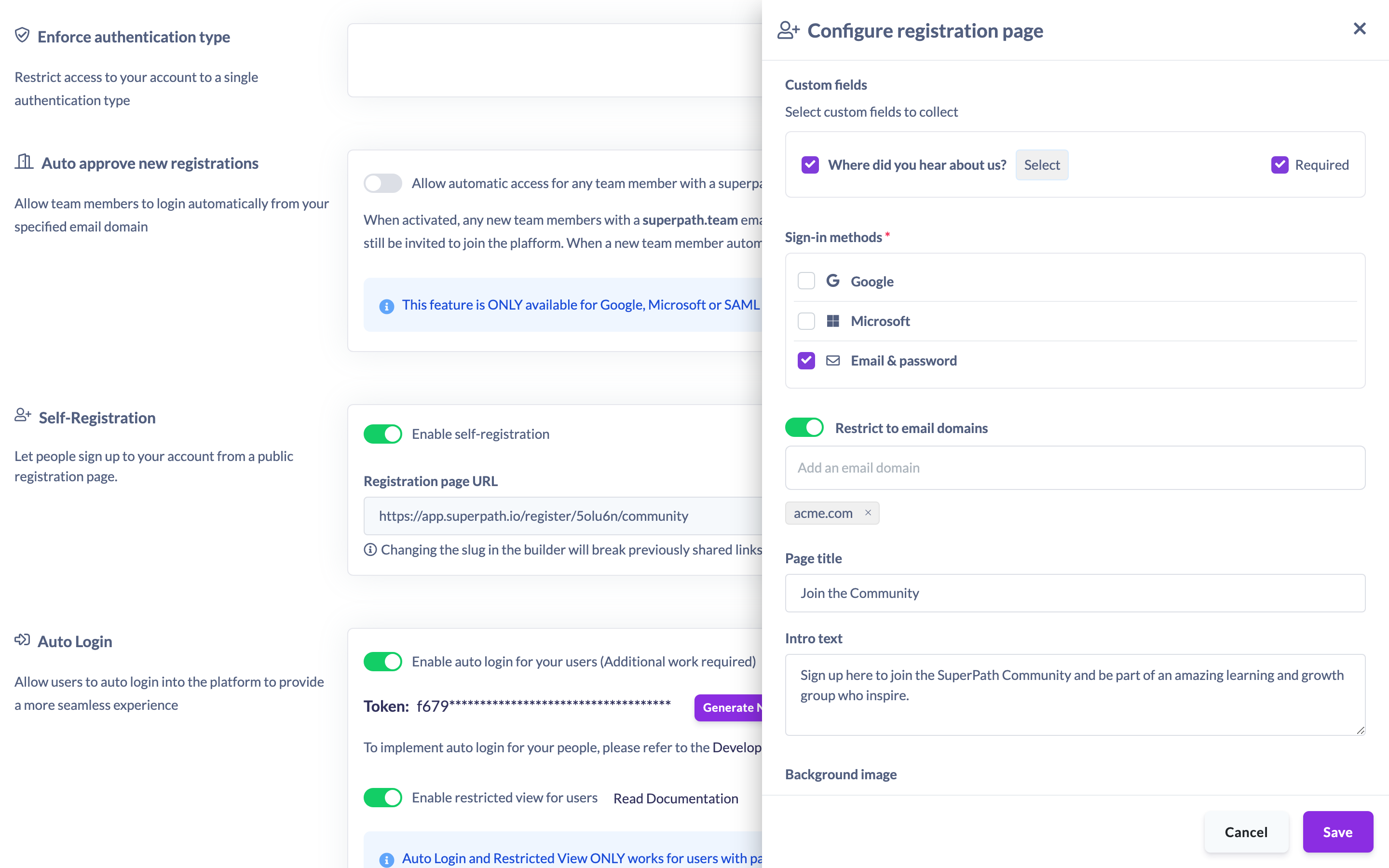
Only people whose email address ends in one of your allowed domains will be able to register. The check is applied to the email they sign in with, before they reach the registration form.
What a blocked registrant sees
If someone signs in with an email that isn't on your allowed list, they don't reach the form. Instead they see a friendly message headed "Can't register with this email", explaining that the page is limited to specific email addresses and inviting them to register with their work email. They can choose Use a different email to go back and try again with an allowed address.
Things to keep in mind
- Leaving the restriction off — or turning it on with an empty list — means any email domain is allowed to register.
- Your allowed-domain list stays private on the server and is never exposed on the public page.
- The domain check runs against the email the registrant signs in with, so it applies to Google, Microsoft, and Email & password sign-ins alike.
- The restriction is server-enforced, so it applies even if someone tries to bypass the page's on-screen checks.
FAQs
What happens if I don't add any domains?
If the restriction is off, or on with no domains listed, registration is open to any email domain.
Can I allow more than one domain?
Yes. Add as many domains as you need — a registrant is allowed if their email matches any one of them.
Can registrants see which domains are allowed?
No. The allowed-domain list is kept on the server and is never shown on the public registration page.
Who can do this
Only the Owner can configure the registration page, including the email-domain restriction. Admins, Managers, Content Managers, People Managers, Instructors, Employees and Restricted users cannot.
Updated on: 19/07/2026
Thank you!