
How to Set the Role for Self-Registered Users
How to Set the Role for Self-Registered Users
In this article:
- Overview
- How to set the role
- Things to keep in mind
- FAQs
- Who can do this
Overview
Self-Registration lets people sign themselves up to your platform from a public registration page, instead of you inviting or importing each person. Every account created through that page is given the same role — the one you choose here — so you decide up front what level of access new sign-ups get.
You can only assign one of the non-privileged roles: Employee, Member, or Instructor. Privileged roles (Owner, Admin, Manager) can't be handed out through a public page, so they're deliberately left out of the picker.
How to set the role
- Go to Settings → Security.
- In the Self-Registration section, click Configure page.
- In the panel that opens, find Role for new sign-ups.
- Choose Employee, Member, or Instructor from the dropdown.
- Click Save.
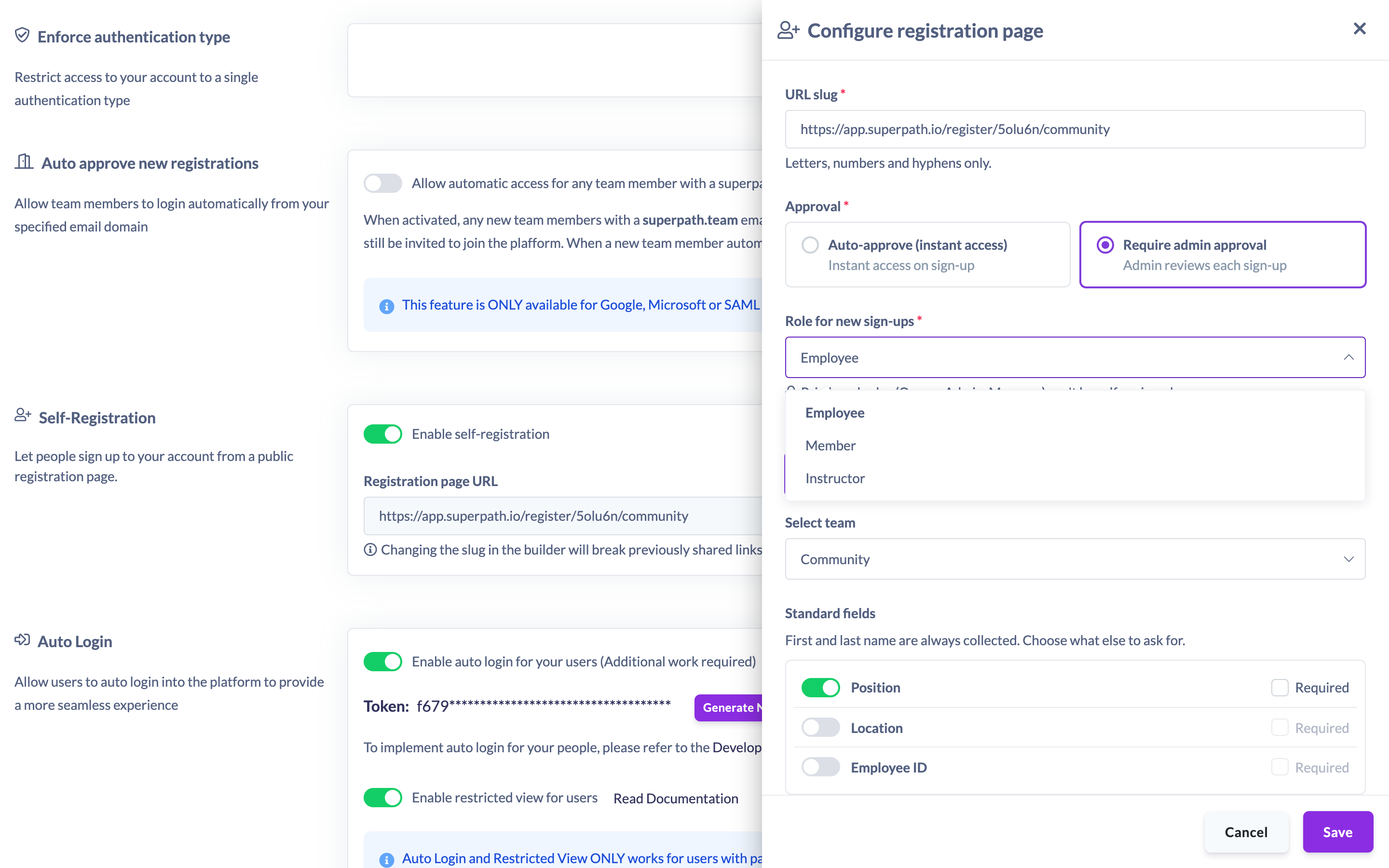
Everyone who signs up through the registration page is created with the role you select. New sign-ups default to Employee until you choose otherwise.
Note: The role is applied on the server when the account is created, so it can't be changed by the person signing up. If you ever need a different role for someone, update their profile after they've joined.
Things to keep in mind
- Only Employee, Member, and Instructor can be assigned through Self-Registration. Owner, Admin, and Manager can never be self-assigned — the platform rejects any attempt to do so.
- The role applies to every account created through the page, whether sign-ups are approved automatically or reviewed first.
- Changing the role here only affects people who sign up afterwards. It doesn't change the role of anyone who has already registered.
- You can still change any person's role later from their profile, exactly as you would for a user you added yourself.
FAQs
Can I let people register as an Admin or Manager?
No. Privileged roles (Owner, Admin, Manager) can't be self-assigned. The role picker only offers Employee, Member, and Instructor, and the platform blocks any privileged role even if it's submitted directly.
Does each person get to pick their own role?
No. The role is set by you in the configuration and applied to every sign-up. The person registering never sees or chooses a role.
What happens if I don't choose a role?
New sign-ups default to the Employee role.
Who can do this
Only the Owner can configure Self-Registration, including the role for new sign-ups. The Self-Registration settings live under Settings → Security, which is restricted to the Owner. Admins, Managers, People Managers, Content Managers, Instructors, Employees, and Restricted users cannot access these settings.
Updated on: 19/07/2026
Thank you!