
How to Choose Who Can Start Discussions
How to Choose Who Can Start Discussions
In this article:
- Overview
- How to set who can start discussions
- How each option maps to roles
- Things to keep in mind
- FAQs
- Who can do this
Overview
By default every non-restricted user can start a discussion. If you would rather keep discussion creation with your leaders, the Who can create discussions setting lets you narrow that down to managers and admins, or to admins only. This controls who sees the "Start discussion" buttons on learning content, Pathways, Events, Roadmap levels and Knowledge articles, and it is enforced on the server when a discussion is created.
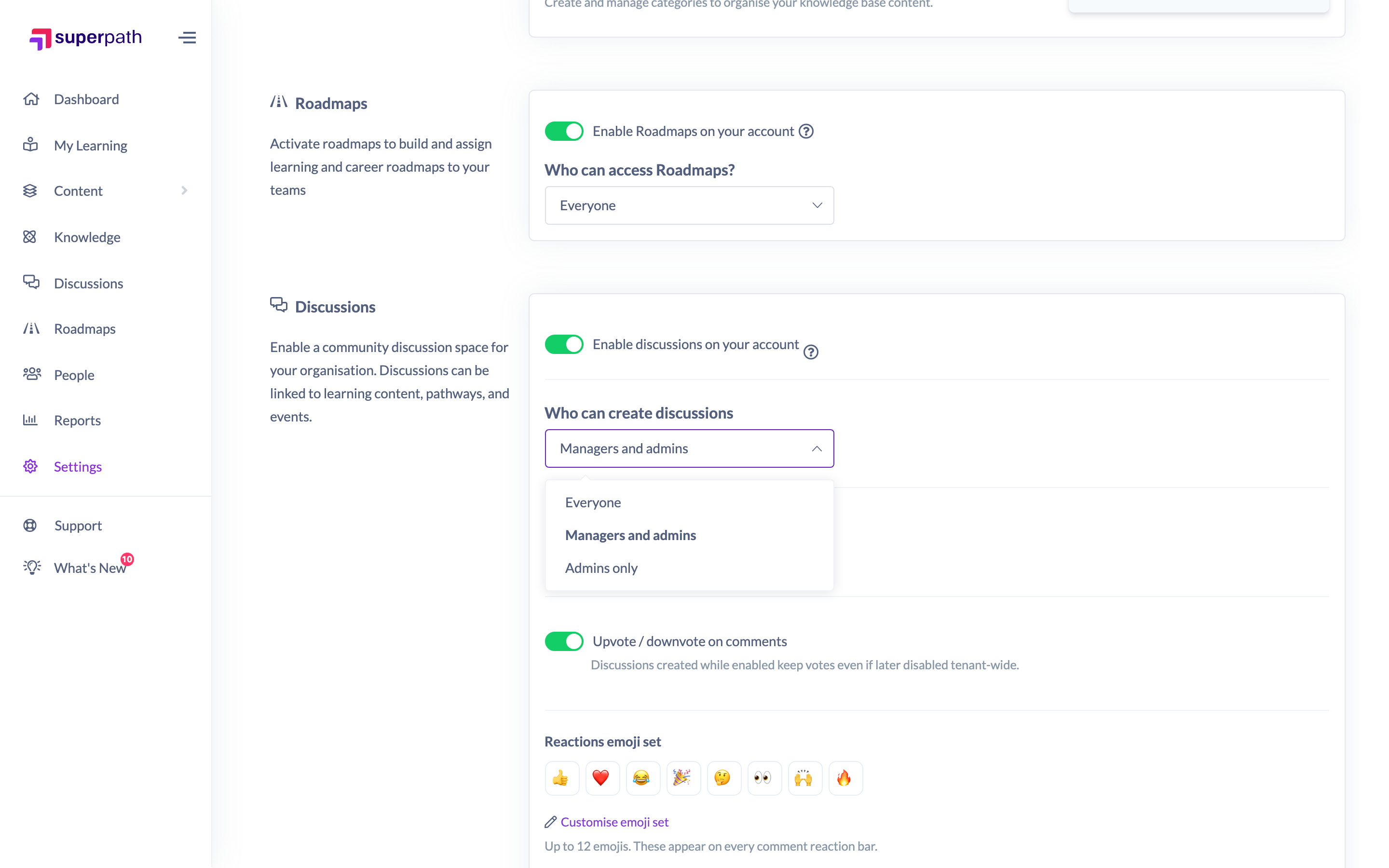
How to set who can start discussions
- Go to Settings → Features.
- Scroll to the Discussions section (Discussions must already be enabled).
- Open the Who can create discussions dropdown and choose one of Everyone, Managers and admins or Admins only.
- Click Save to apply the change.
How each option maps to roles
- Everyone — every role except Restricted can start discussions. Restricted users are always excluded by design and never see the create buttons.
- Managers and admins — Owners, Admins, Managers, Content Managers and People Managers can start discussions. Instructors, Employees and Restricted users cannot.
- Admins only — only Owners and Admins can start discussions.
Things to keep in mind
- This setting governs the entity-attached create buttons. It controls the "Start discussion" buttons that appear against content, Pathways, Events, Roadmap levels and Knowledge, and it is re-checked on the server, so it cannot be bypassed from the interface.
- The Discussions hub has its own, separate rule. The "Start discussion" button in the main Discussions hub is always limited to Owners, Admins and Managers, regardless of what you pick here. Content Managers and People Managers do not get the hub button even under Everyone or Managers and admins — they can still start discussions from the entity-attached buttons where the setting allows it.
- Restricted users are never included. Even under Everyone, the Restricted role cannot start discussions.
- Changing this setting only affects who can start new discussions. It does not change who can view or comment on existing ones.
FAQs
Does "Everyone" really mean everyone?
It means every role except Restricted. Restricted users are always excluded from starting discussions.
Why can a Content Manager start a discussion on a course but not from the Discussions hub?
The two surfaces use different rules. The entity-attached create buttons follow the Who can create discussions setting, so a Content Manager can start one under Everyone or Managers and admins. The hub's "Start discussion" button is hard-limited to Owners, Admins and Managers and ignores this setting.
If I switch to "Admins only", what happens to discussions non-admins already created?
Nothing — existing discussions are untouched. The setting only affects who can create new ones from now on.
Who can do this
Only Owners and Admins can reach Settings → Features and change the Who can create discussions setting. Other roles cannot open Settings. Note that this is separate from who the setting then allows to create discussions.
Updated on: 16/07/2026
Thank you!