
How to Mention Someone in a Comment
How to Mention Someone in a Comment
In this article:
- Overview
- How to mention someone
- Things to keep in mind
- FAQs
- Who can do this
Overview
An @-mention lets you tag a specific person in a comment or reply. Their name is highlighted in the posted comment, and they're notified that you mentioned them — a quick way to pull the right person into a conversation or make clear who you're answering.
How to mention someone
- Start writing a comment or reply.
- Type @ followed by the person's name. A list of matching people appears as you type, showing each person's name, avatar and email.
- Pick the person you want — either click their name, or use the arrow keys to highlight them and press Enter.
- Their name is inserted as a highlighted mention. Finish your comment and click Comment to post.
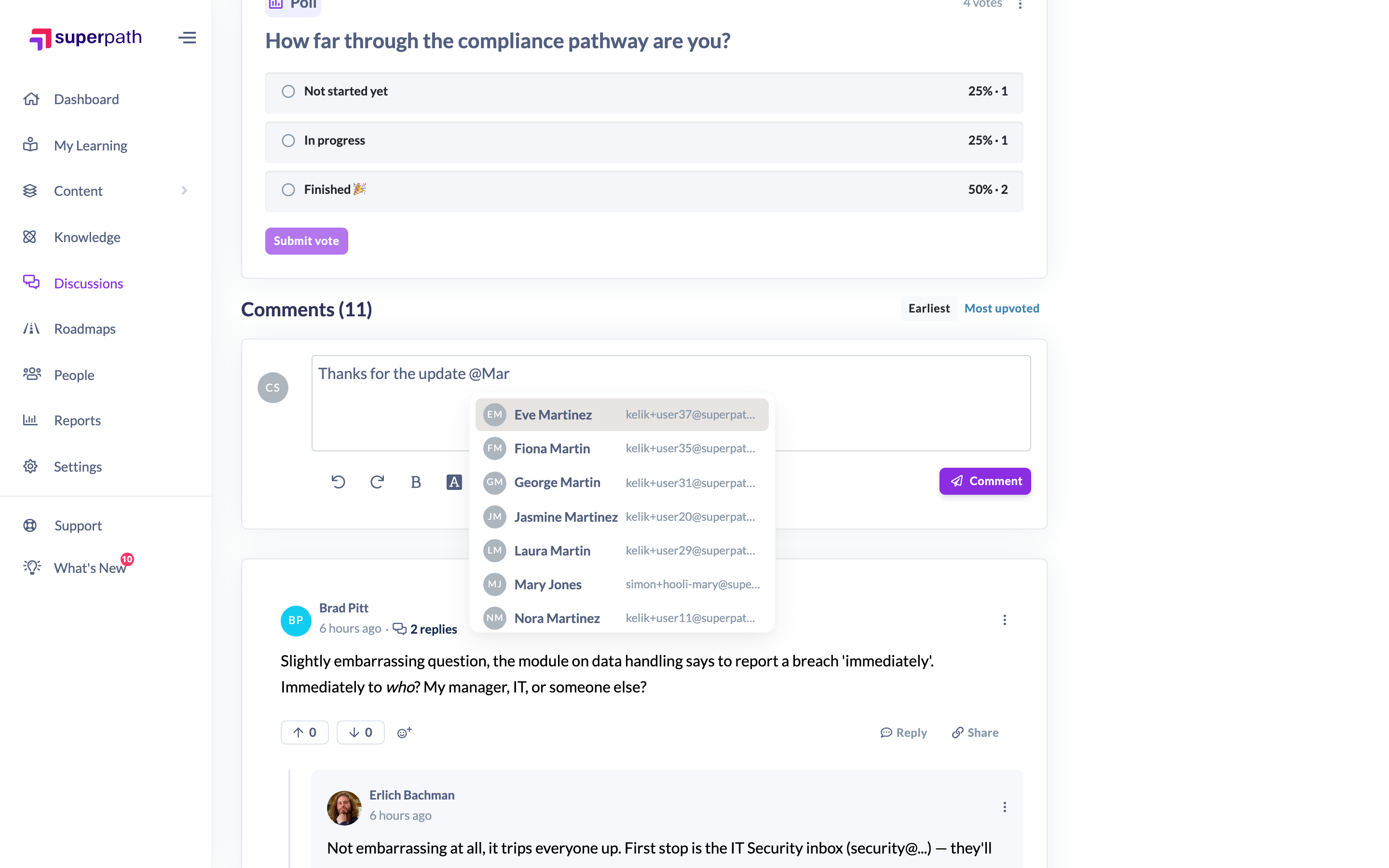
Tip: You can mention more than one person in the same comment — just type @ again for each person.
Things to keep in mind
- The mention list searches the people in your organisation, so you can only mention users who exist in your SuperPath account.
- The list shows up to eight matches at a time; keep typing to narrow it down if you don't see the person straight away.
- Search starts once you type a name after the @ — an empty @ on its own won't show a list.
- The people you mention are notified that you tagged them, so they can jump straight to the comment.
FAQs
Who can I mention?
Anyone in your organisation who comes up when you search after typing @. If a name doesn't appear, that person may not have a matching profile in your SuperPath account.
Does the person I mention get notified?
Yes. Mentioning someone sends them a notification linking back to your comment.
Nothing happens when I type @ — why?
The search only runs once you begin typing a name. Type a letter or two after the @ and matching people will appear.
Who can do this
Anyone who can comment on a discussion can mention people in their comments — Owners, Admins, Managers, Content Managers, People Managers, Instructors, Employees and Restricted users.
Updated on: 16/07/2026
Thank you!