
How to Set the Default Discussion Access Type
How to Set the Default Discussion Access Type
In this article:
- Overview
- How to set the default access type
- The access types explained
- Things to keep in mind
- FAQs
- Who can do this
Overview
Every discussion has an access type that decides who can see it. The Default access type setting chooses which value is pre-selected when someone starts a new discussion, so you can steer your community towards open conversations or private, invite-only ones without forcing the creator's hand. The person starting the discussion can still change the access type on that discussion before they post it.
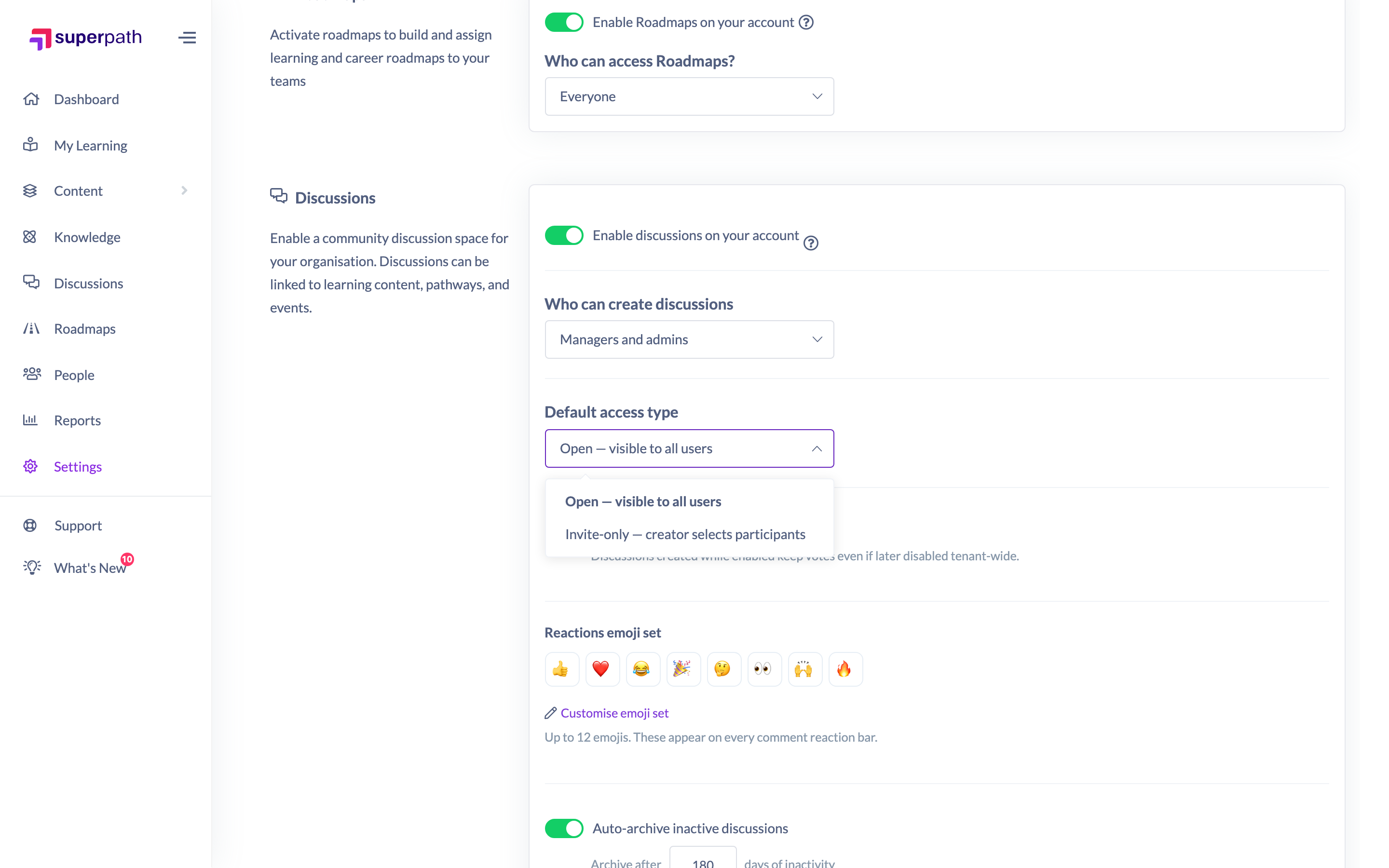
How to set the default access type
- Go to Settings → Features.
- Scroll to the Discussions section (Discussions must already be enabled).
- Open the Default access type dropdown and choose Open or Invite-only.
- Click Save to apply the change.
The access types explained
- Open — visible to all users. The discussion appears for everyone who can access Discussions. This is the default for a newly enabled tenant.
- Invite-only — creator selects participants. The discussion is visible only to the people the creator invites (and to admins/owners who manage discussions).
Note: There is also a Team-only access type, which limits a discussion to members of chosen Teams. Team-only can be selected on an individual discussion when it is created, but it is not offered as a tenant-wide default — the Default access type dropdown only lists Open and Invite-only.
Things to keep in mind
- This setting only changes the pre-selected value on the new-discussion form. It does not lock the access type — the creator can switch it before posting.
- Because it is only a default, changing it never alters the access type of discussions that already exist.
- An Invite-only discussion needs at least one invited participant, and a Team-only discussion needs at least one selected Team, before it can be posted.
FAQs
Why can't I set the default to Team-only?
Team-only exists as a per-discussion access type but is intentionally left out of the tenant-wide default. Creators can still choose Team-only on an individual discussion; you just cannot make it the pre-selected default for everyone.
Does changing the default affect existing discussions?
No. It only changes what is pre-selected the next time someone starts a new discussion.
Can a creator override the default I set?
Yes. The default simply pre-fills the access type on the new-discussion form; whoever starts the discussion can change it before posting.
Who can do this
Only Owners and Admins can reach Settings → Features and change the Default access type. Other roles cannot open Settings. Choosing the access type on an individual discussion is available to whoever is starting that discussion, subject to the Who can create discussions setting.
Updated on: 16/07/2026
Thank you!