
How to Control Who Can Access Knowledge
How to Control Who Can Access Knowledge
In this article:
- Overview
- How to set who can access Knowledge
- How to restrict an article to specific Teams
- How to hide an article from search and category listings
- Things to keep in mind
- FAQs
- Who can do this
Overview
Knowledge is your organisation's central store of reference articles — policies, processes, FAQs and anything else your people need to look up rather than work through as a course. Because that content often includes information that isn't for everyone, SuperPath gives you two levels of control: an account-wide setting that decides which roles get Knowledge at all, and a per-article setting that limits an individual article to specific Teams.
Use the account-wide setting when you're rolling Knowledge out gradually or want to keep it in the hands of your leadership group. Use the per-article Team restriction when Knowledge is open to everyone but a handful of articles need to stay with a particular group.
How to set who can access Knowledge
- Go to Settings → Features.

- Scroll down to the Knowledge Base section.

- Make sure Enable the Knowledge Base on your account is switched on — the access options only appear once it is.
- Under Who can access Knowledge?, choose who should get Knowledge: Everyone, Managers & Admins, or Admin Only.

- Click Save in the Unsaved changes bar at the top of the page.

Here's what each option covers:
- Everyone — every role except Restricted users.
- Managers & Admins — Owners, Admins, Managers, Content Managers, People Managers and Instructors. Employees won't see Knowledge.
- Admin Only — Owners and Admins only.
People outside the level you choose no longer see Knowledge in the left-hand navigation, so it stops being part of their day-to-day experience. To restrict who can actually open a particular article, use Restricted To Teams on the article itself — that is the control that limits access to the content.
Note: This setting is separate from the Library. The Library has its own access setting under Settings → Library.
Good to know: Switching Enable the Knowledge Base on your account off hides Knowledge and everything related to it, but it doesn't delete anything. Your articles are kept and reappear as soon as you switch it back on.
How to restrict an article to specific Teams
If Knowledge is open to everyone but a particular article isn't, restrict that article to one or more Teams.
- Go to Knowledge in the left-hand navigation.
- Click Manage Articles at the top of the Knowledge homepage and click the article you want to change. (Owners, Admins and Content Managers can also open an article and click Edit Article.)
- In the Settings panel on the right of the editor, find Restricted To Teams.
- Use Select teams to choose the Teams that should be able to open the article.
- Publish the article to apply the change.
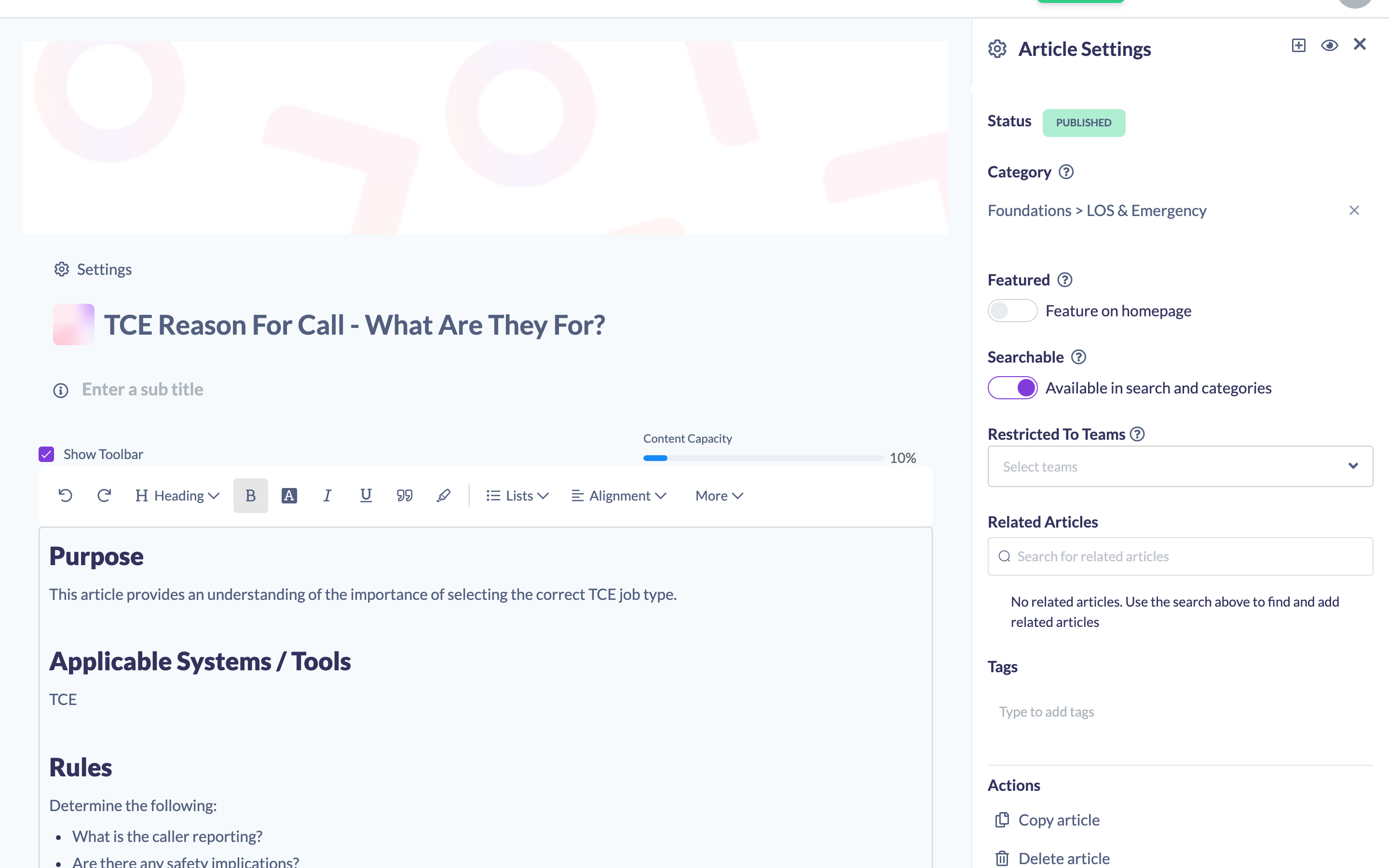
Once at least one Team is set, only people in those Teams can open the article, and it stops appearing in search results and category listings for everyone else. Owners and Admins always keep access, so they can still review and maintain restricted articles.
Tip: Leave Restricted To Teams empty to keep an article open to everyone who can see Knowledge.
How to hide an article from search and category listings
The Searchable toggle in the same Settings panel controls discoverability rather than permission.
- Open the article in the editor and open the Settings panel.
- Switch Available in search and categories off.
- Publish the article.
The article no longer turns up in Knowledge search or in its category, but anyone who has the link — and who can see Knowledge — can still open it. Use this for articles you want to link to from elsewhere without cluttering up the Knowledge homepage.
Things to keep in mind
- Restricted users never get Knowledge, whatever the account-wide setting says. They're always sent to My Learning instead.
- The account-wide setting works by role, and it controls whether Knowledge appears in the navigation for that role. It isn't a content lock on its own — for anything that must stay with a specific group, set Restricted To Teams on the article as well.
- If a Knowledge article is used as a step inside a pathway, the people assigned that pathway still read it in the pathway player — the account-wide setting governs the Knowledge section, not content delivered as learning. Use Restricted To Teams if a particular article must never be readable by that audience.
- Knowledge categories don't have their own access setting. The only category-level option is Show on Knowledge Homepage, which controls whether the category tile appears on the Knowledge homepage — not who can read its articles.
- Searchable and Restricted To Teams do different jobs. Searchable hides an article from search and category listings; Restricted To Teams actually limits who can open it.
- Changes to article settings take effect when the article is published, not while it's still a draft.
FAQs
Where do I turn Knowledge on or off for the whole account?
Under Settings → Features, in the Knowledge Base section. The toggle is Enable the Knowledge Base on your account.
Can I give one Team access to Knowledge and no one else?
Not with the account-wide setting — that works by role, not by Team. Set Knowledge to Everyone and then use Restricted To Teams on each article to limit it to the Team you want.
Will restricting an article to Teams hide it from search?
Yes. People outside the selected Teams won't see the article in search results or in its category, and can't open it by link. Owners and Admins still see it.
What happens to my articles if I switch the Knowledge Base off?
Nothing is deleted. Knowledge disappears from the navigation and all related features stop being available, and everything comes back when you switch it on again.
Can a Manager change who can access Knowledge for the whole account?
No. The account-wide setting lives under Settings, which only Owners and Admins can open. Managers and Content Managers can still restrict individual articles to Teams.
Who can do this
Owners and Admins can set the account-wide Knowledge access level, because it lives under Settings, which is only available to those two roles.
Owners, Admins, Managers and Content Managers can edit articles and so can set Restricted To Teams and Searchable on an individual article. People Managers, Instructors, Employees and Restricted users cannot — they have read-only access to Knowledge, and Restricted users have no access to Knowledge at all.
Updated on: 25/07/2026
Thank you!