
How to Feature a Knowledge Article on the Homepage
How to Feature a Knowledge Article on the Homepage
In this article:
- Overview
- Open the article settings
- Feature the article on the homepage
- Things to keep in mind
- FAQs
- Who can do this
Overview
Featuring a Knowledge article makes it appear in the Featured Articles list on the Knowledge search homepage, giving your most important content extra visibility. You turn this on from the article's settings panel inside the editor. This article covers how to do that.
Open the article settings
- Open the Knowledge article you want to edit so it loads in the editor.
- In the top navigation, click the cog icon (tooltip Settings) to open the Article Settings panel on the right.

Feature the article on the homepage
- In the Article Settings panel, find the Featured section.
- Turn on the Feature on homepage switch.
- Your choice saves automatically — there's no separate save button in the settings panel.
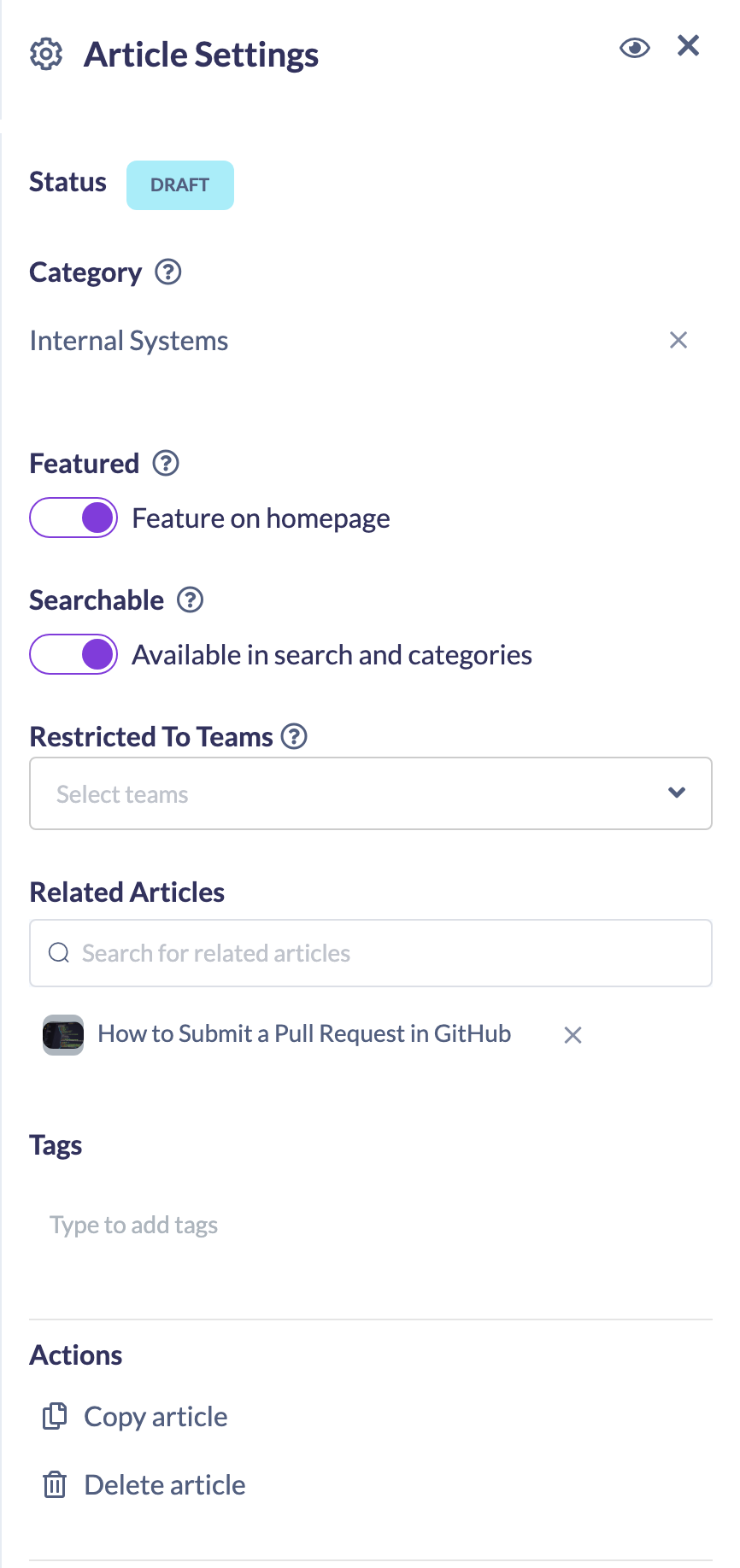
Note: As the panel's help icon explains, switching this on sets the article to appear in the Featured Articles list on the search homepage. Turn the switch off to remove it from that list.
Things to keep in mind
- Featuring an article adds it to the Featured Articles list on the Knowledge search homepage; it does not change the article's category or its search behaviour.
- For learners to reach a featured article, it still needs to be published and searchable.
FAQs
Where does a featured article appear?
In the Featured Articles list on the Knowledge search homepage.
How do I stop featuring an article?
Open the article's Article Settings panel and turn off the Feature on homepage switch.
Does featuring an article publish it?
No. Featuring only controls whether the article appears in the Featured Articles list — you still publish the article separately.
Who can do this
Owners, Admins, Managers and Content Managers can edit Knowledge articles and feature them on the homepage. People Managers, Instructors, Employees and Restricted users have read-only access to Knowledge and cannot.
Updated on: 19/07/2026
Thank you!